Quick reference
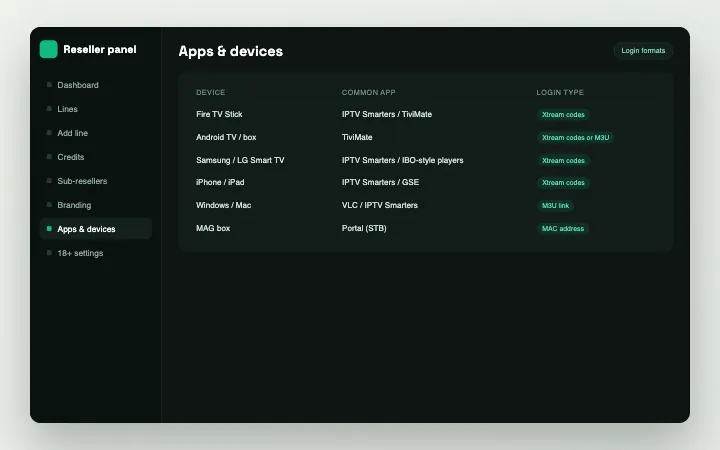
Which IPTV reseller app for which device?
| Device | App to recommend | Login to send | Setup tip |
|---|---|---|---|
| Fire TV Stick | TiviMate or IPTV Smarters | Xtream codes | Install the Downloader app first if the player isn't in the store. |
| Android TV / box | TiviMate | Xtream codes or M3U | Set the guide to refresh daily. |
| Samsung / LG smart TV | IPTV Smarters or a similar player app | Xtream codes | Check the app is available in the TV's store for that model. |
| iPhone / iPad | IPTV Smarters or GSE | Xtream codes | Turn on picture-in-picture if the customer wants it. |
| Windows / Mac | VLC or IPTV Smarters | M3U link | VLC is fine for testing; a player app is nicer for daily use. |
| MAG box | Built-in portal | Portal URL and MAC address | Send the MAC address to us correctly; one wrong character stops it working. |
Login formats
Xtream codes, M3U or MAG portal?
Every line you create in the panel comes with the three formats. The difference is how the app asks for them:
- Xtream codes: a server address, username and password. Most player apps prefer this; it loads the guide and on-demand library neatly.
- M3U link: one long link with everything inside. Handy for VLC and older apps.
- MAG portal: for MAG set-top boxes, using the portal address and the box's MAC address.
Setup message
A setup message that prevents support calls
Name the app
One app per device, with a link or the exact name to search in the store.
Send the login in the right format
Xtream codes for most apps, M3U for VLC, portal details for MAG.
Explain the PIN if they have 18+
How to set it and why it matters on a shared TV.
Give your contact and hours
Customers relax when they know who to message and when.
Questions
Questions about apps
Do you provide your own app?
Customers use standard player apps with the logins from your panel. Ask us about branded app options if you are considering white label.
Which app is easiest for older customers?
IPTV Smarters is simple to navigate; set it up for them and show them the guide button.
Why doesn't an app accept the login?
Usually a typing error or the wrong format. Copy and paste the login rather than typing it, and check the server address.
Can one line work on two devices?
Only if the line allows two connections. You set connections when you create the line.
Are the apps free?
Some are free and some have a paid version. Tell customers before they install so there are no surprises.
Need help with a customer's device?
Send us the device and the app and we tell you the fastest setup.

The IPTV Reseller Premium teamReseller support · updated 6 November 2026
We run the reseller panel and the WhatsApp support line described on this site, and we write these pages from the questions resellers send us.